Translate Amazon Listing Images for Global Selling (2026)
Build International Listings will sync the title, bullets, and description into amazon.de. The infographic in slot 2 will not move with them. Feature callouts, size charts, comparison panels, and “why buy” graphics are pixels, not catalog fields. Shoppers on the German or Japanese storefront still read English on the image while the rest of the listing is localized — and that mismatch is now a conversion and compliance problem, not a nice-to-have.
Amazon started auto-translating text inside secondary listing images across 14 stores in August 2026. The main image is exempt. Stylized type, packaging curvature, and small legal lines are the cases sellers already report as missed or mangled. Uploading your own image in the local language replaces Amazon’s version. This guide is for that job: produce a listing-ready infographic in the target language without a reshoot, then QA the claims Amazon’s overlay is not allowed to get wrong.
The listing is translated. The infographic is not.
Marketplace translation tools stop at the text fields. Amazon’s Build International Listings, Shopify Markets, and most listing apps never open the JPEG. The ingredient callout, the 32 oz badge, the comparison chart — all of that stays in the source language until someone edits the file.
That is a different problem from “translate a photo of a street sign.” Google Translate and Lens are built to help a person read. A listing image has to be sold: same product, same lighting, type that looks printed into the graphic, no white boxes, no leftover English ghosting through. If the German line is 30% longer, the badge has to reflow. If the source was a 1688 factory panel, the US listing still needs native English, not a camera overlay.
Localize the infographic, keep the product shot
Upload one listing graphic, pick German or Japanese, and download a rebuilt image — callouts translated, bottle and lighting unchanged.
Translate listing images →Why Amazon’s auto-translate is not a listing image
Amazon’s August 2026 rollout generates translated versions of secondary images when the embedded text does not match the shopper’s language. Useful as a stopgap. Unreliable as the file you wanted on the detail page.
- Main image never moves. If you put a text-heavy graphic in slot 1, it stays in the source language and also fights Amazon’s main-image rules (no badges, no overlays). Infographics belong in secondary slots.
- Detection skips the hard pixels. Seller threads already list the misses: stylized fonts, logos treated as words, text on curved packs, low-contrast legal lines. Those are exactly the images that convert.
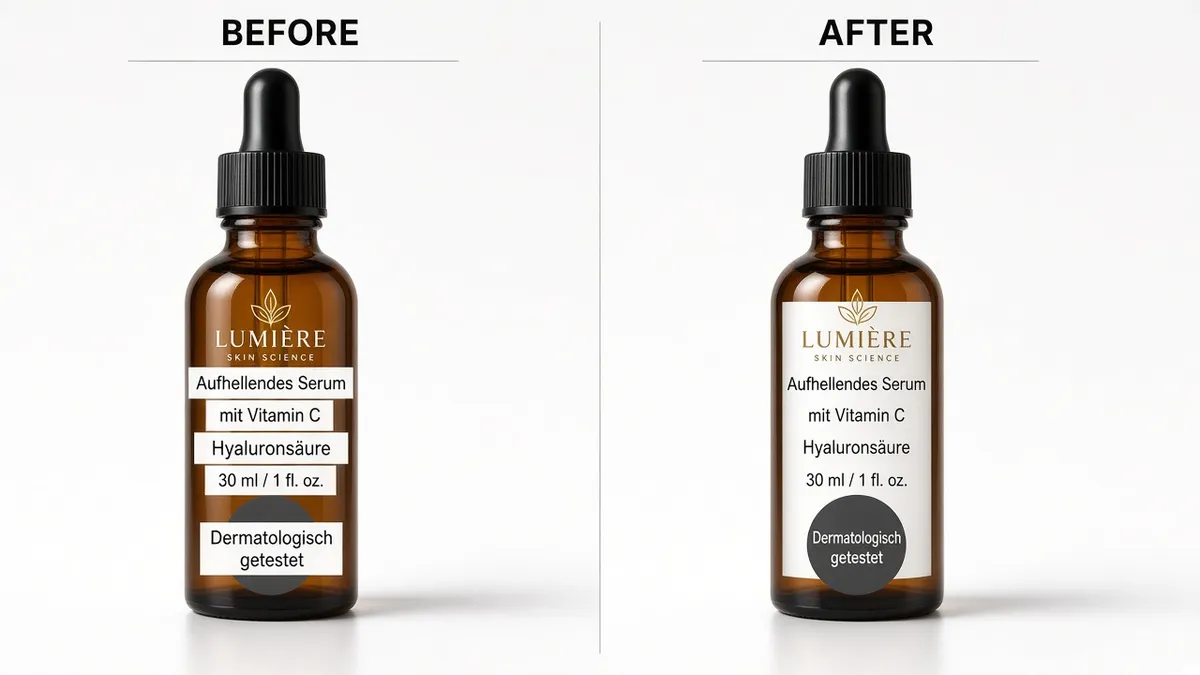
- Wrong units and claims ship. AI quality guardrails are not a regulatory review. A mistranslated allergen, wattage, or “dermatologist-tested” line is still your listing. Amazon’s own guidance is that a seller-supplied local-language image replaces the generated one — which only helps if you have that file.
Treat Amazon’s version as a customer-facing draft you did not approve. The paying workflow is: you generate the local infographic, you check the numbers, you upload it as the country-specific asset.
Three things that actually break on a listing graphic
1. German (and French) will not fit the English box
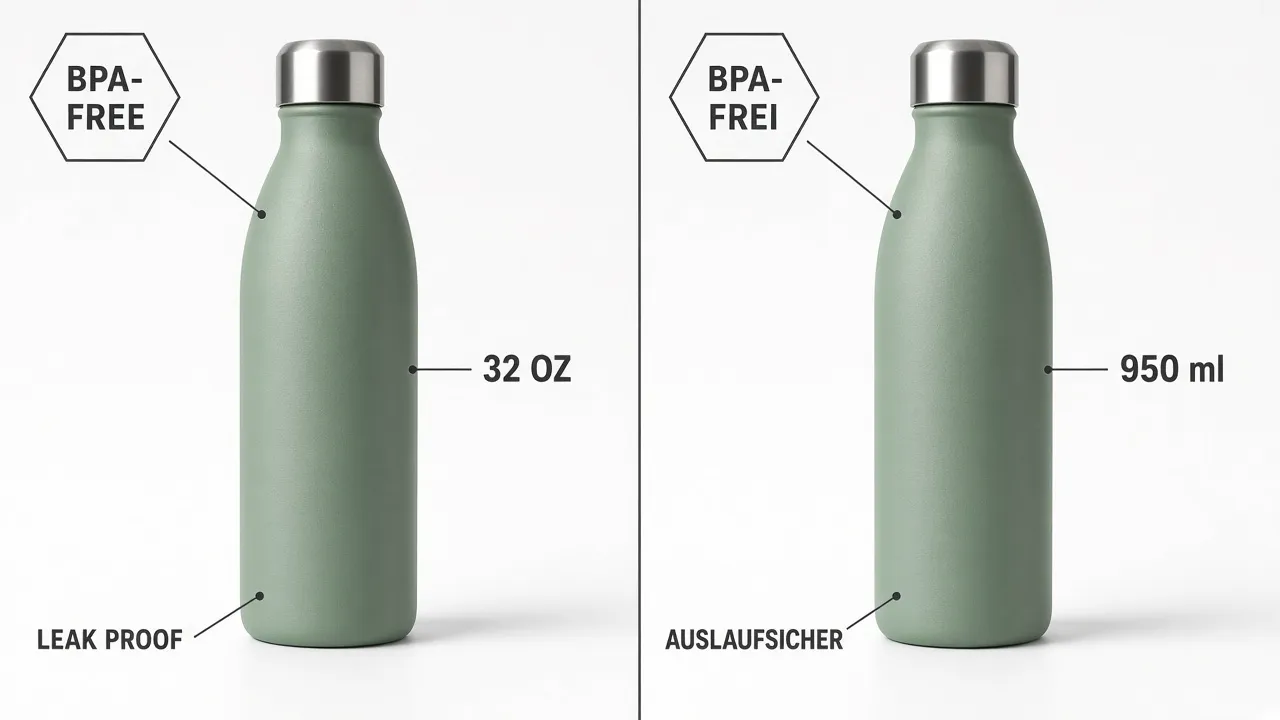
English-to-German UI copy commonly expands on the order of 30%. Localization references put Romance languages in the 15–30% range and German compound words higher still — “leak proof” is not the same width as “auslaufsicher.” An AI that pastes the translation into the original badge draws type over the product. A usable listing image has to shrink type, wrap a line, or widen the badge. That is layout work, not OCR.
2. CJK contracts horizontally and still needs the hierarchy
Chinese or Japanese callouts often occupy less horizontal space than English. The risk is not overflow — it is a sparse, English-looking composition with a tiny caption floating in a huge box. Keep the same visual weight as the source: if “BPA-FREE” was a bold badge, the Japanese line still has to read as a badge, not a footnote.
3. Numbers are not copy
32 oz is ~950 ml, not “32 oz” left in English on a DE infographic, and not a hallucinated 500 ml. Ingredient lists, allergen statements, electrical ratings, and certification marks need a human lock. Use the optional instruction field to freeze brand names, SKUs, and units (“keep 950 ml, do not convert 32 oz to 1 L”). Then read the output against the source before it hits Image Manager.
| Job | What it actually does | Fit for a live infographic? |
|---|---|---|
| Build International Listings | Translates title, bullets, description | No — never opens the image file |
| Amazon auto-translate (2026) | Generates secondary-image variants; main image skipped | Draft only — QA and replace |
| Google Translate / Lens | Overlay or copied text so a person can read | No — not a downloadable listing asset |
| Photoshop / designer pass | Manual erase, font match, typeset per language | Yes, if you have the source file and a day |
| AI image translator | Rebuilds translated type into the same photo | Yes, after a claims check |
Two jobs sellers actually run
Do not mix them in one prompt. The pixels look similar; the risk is not.
Outbound: your English graphic onto DE / JP / FR
You already have the US infographic. Expand the ASIN, then localize every secondary image that contains words. Keep the product photography bit-identical. Change only the baked-in type. This is the Global Selling gap: the catalog text is German, the chart is still English, until you replace it.
Inbound: 1688 / Taobao / factory panels into English
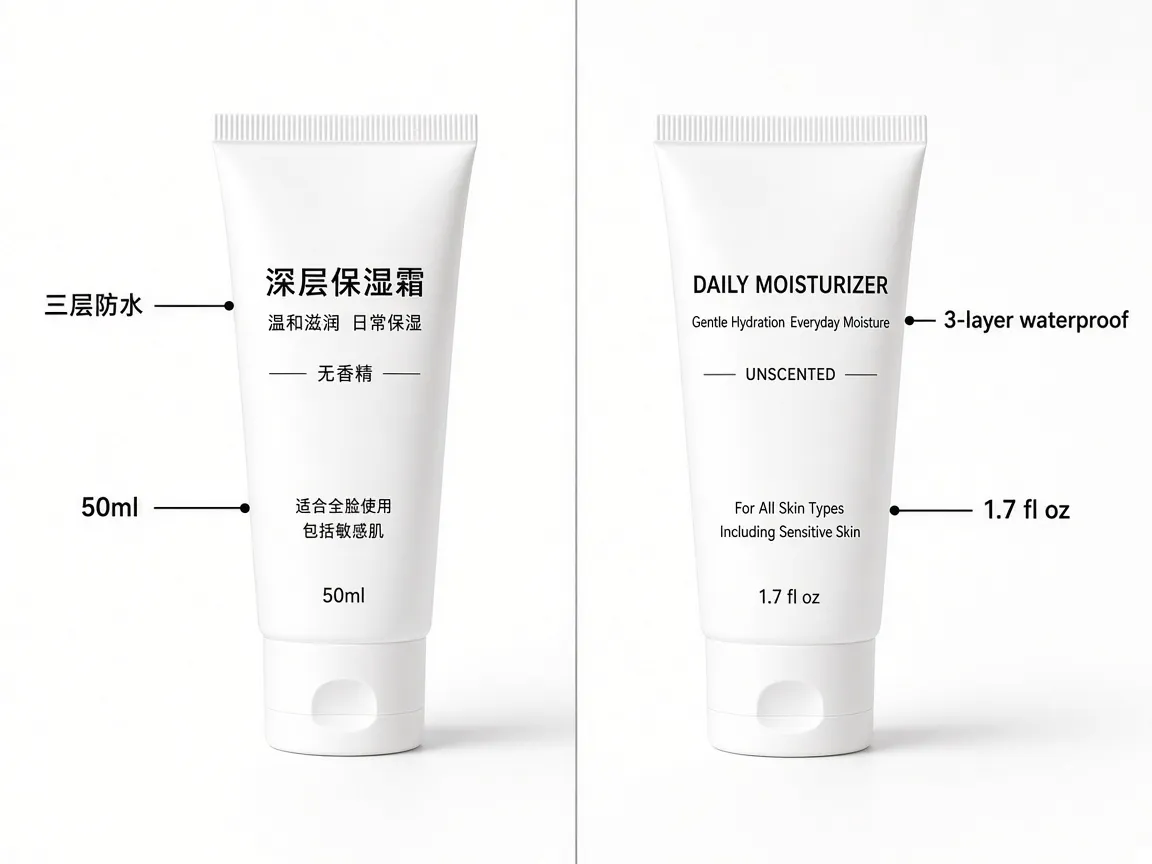
The supplier sent a white-background tube with 三层防水 and 50 ml already designed into the frame. US and EU shoppers will not read it, and Amazon will not treat that file as an English listing image. Translate the callouts and on-pack lines you are licensed to use. You still own image rights and regulated copy — sourcing a JPEG from a factory chat is not a license, and rewriting an ingredient deck is not a design task.
How to translate Amazon listing images without a reshoot
One graphic at a time. Use the highest-resolution secondary image you already serve, not a compressed screenshot of the detail page.
- Pull the live file, not a phone photo of the monitor. PNG for charts and sharp badges; JPEG is fine for lifestyle. Amazon zoom wants a long edge of 2000 px or more when you can get it. Tiny 72 dpi callouts will come back mushy in any translator.
- Upload to an AI image translator and set the target language. Source language is detected. German, Japanese, Spanish, French, Chinese, Korean are in the current 16-language set. This is a rebuilt image, not an OCR text dump.
- Lock the strings that must not drift. In optional instructions: brand names, model numbers, “keep 950 ml”, “do not rewrite the allergen line — leave it and I will paste the approved German.” If the first pass invents a certification mark, discard it.
- QA against the source, then upload as the country-specific image. Check overflow, leftover source-language glyphs, unit conversion, and whether the product itself still matches. Then replace Amazon’s auto-translated variant in Image Manager so the file customers see is yours.
Expect a second pass on dense comparison charts and on text that wraps a bottle. Flat infographic panels (the BPA-FREE / 32 OZ style) are the clean case. Curved label photography is the hard case — retry with a tighter instruction naming the panel, or fall back to a designer for the legal wrap.
What this will not do
It will not make a text-heavy graphic legal as a main image. It will not certify an ingredient list. It will not batch a 40-image A+ module in one click — run each file, because each file has different claims. And it will not beat a native typesetter on a campaign with a licensed font file. Use it to close the Global Selling hole: the listing reads local, the infographic still has to.
Frequently Asked Questions
How do I translate Amazon listing images for a new marketplace?
Export each secondary infographic at full resolution, translate it into the store language, QA units and claims, then upload the result as the country-specific image. Amazon’s catalog translation never edits those pixels for you.
Does Amazon already translate text in product images?
As of August 2026 it can auto-translate secondary images in 14 stores. The main image is skipped, stylized type is often missed, and you are still responsible for the wording. A local file you upload replaces Amazon’s generated version.
How do I translate Chinese supplier product images into English?
Treat it as inbound localization: licensed factory graphics only, then rebuild the callouts in English. Do not ship a Lens overlay, and do not rewrite regulated ingredients as if they were marketing adjectives.
Will a translated infographic meet Amazon image requirements?
Secondary images can include text, charts, and lifestyle. Keep the main image text-free. After translation, confirm the long edge still meets Amazon’s current zoom minimum and that no leftover boxes or watermarks remain.
Can I use the same workflow for Shopify and Etsy images?
Yes. Those storefronts also translate titles and descriptions without opening the image file. The same rebuilt infographic can go into a DE Shopify theme or an Etsy variation photo after the same claims check.
Replace the English infographic before shoppers see it
Run the live listing graphic through the translator, check the units, and upload the local file so Amazon’s auto-translate is not the version that converts.
Open the AI image translator →