How Wedding Photographers Fix Closed Eyes (AI Guide, 2026)
Shoot a wedding with 150 guests and you will get blinks. Statistically, in any group of six or more people, there is a good chance at least one person closes their eyes the instant the shutter fires. For a candid photographer, that is a fun fact. For someone delivering a paid gallery, it is a liability sitting in the middle of your best frame — the first kiss, the ring exchange, the one moment the couple actually asked you to nail.
You cannot ask forty people to redo the group photo, and you definitely cannot ask the bride to blink on command a second time. Photoshop's clone stamp and eye-swap-from-burst tricks work, but they eat 15-20 minutes per image when you have a stack of them to clear before a delivery deadline. This guide covers the AI workflow photographers are using instead — where it fits in a normal culling pass, what it actually preserves, and where it still falls short of a real reshoot.
Why "Just Grab a Different Frame" Doesn't Always Work
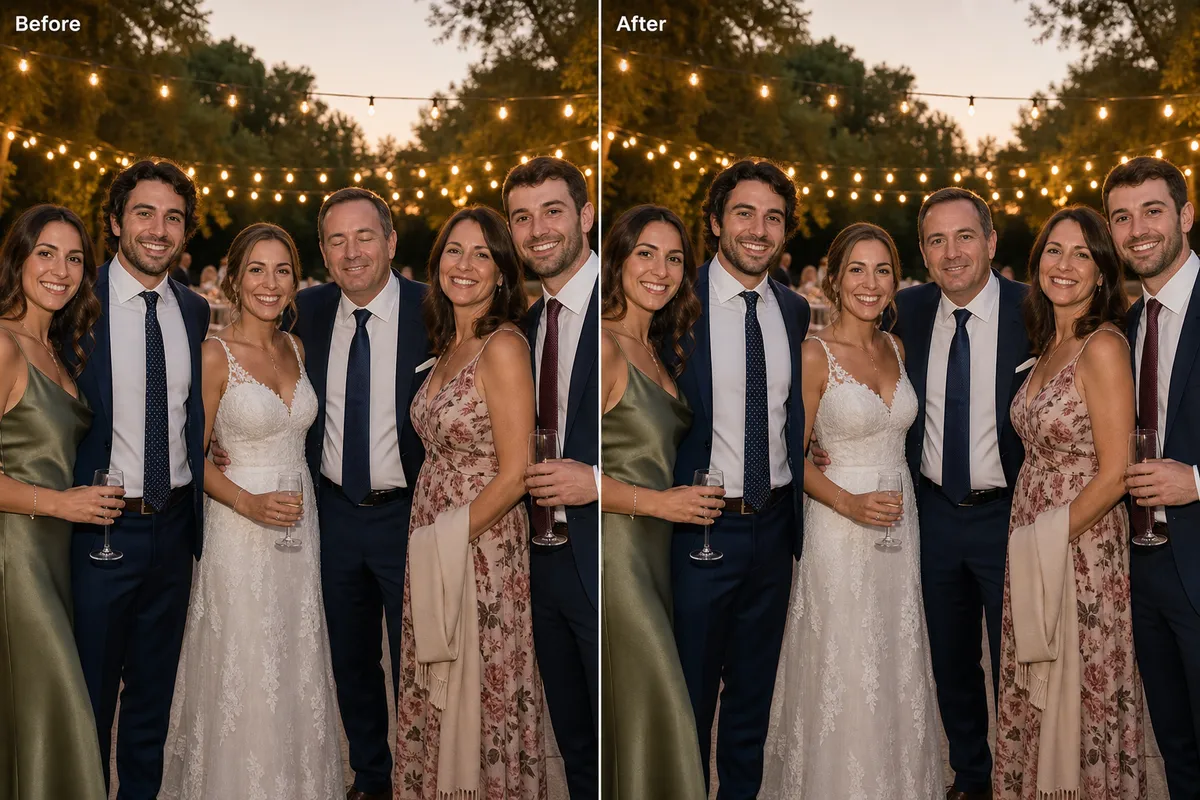
The advice you'll see everywhere is "pull the open-eyes frame from your burst." That works when you shot a tight burst and everyone else in the frame held their pose and expression across those extra frames too. In practice, on a wedding day, that's rarely clean:
- The moment doesn't repeat. A first kiss, a tear, a candid laugh — the surrounding expressions shift frame to frame, so swapping in "open eyes" from three frames later also swaps in a different smile on someone else.
- Group shots often don't have a burst. Formal family lineups are frequently a single frame per pose because you're managing fifteen people's patience, not spraying shutter clicks.
- Old, scanned, or single-frame client submissions (engagement shoots from another photographer, family archive scans a client asks you to restore) have no burst to pull from at all.
When there's no clean frame to borrow from, you're left manually painting in eyelids and eyes in Photoshop — doable, but slow, and easy to get subtly wrong on gaze direction or catchlights.
The AI Fix: One Photo In, One Fixed Photo Out
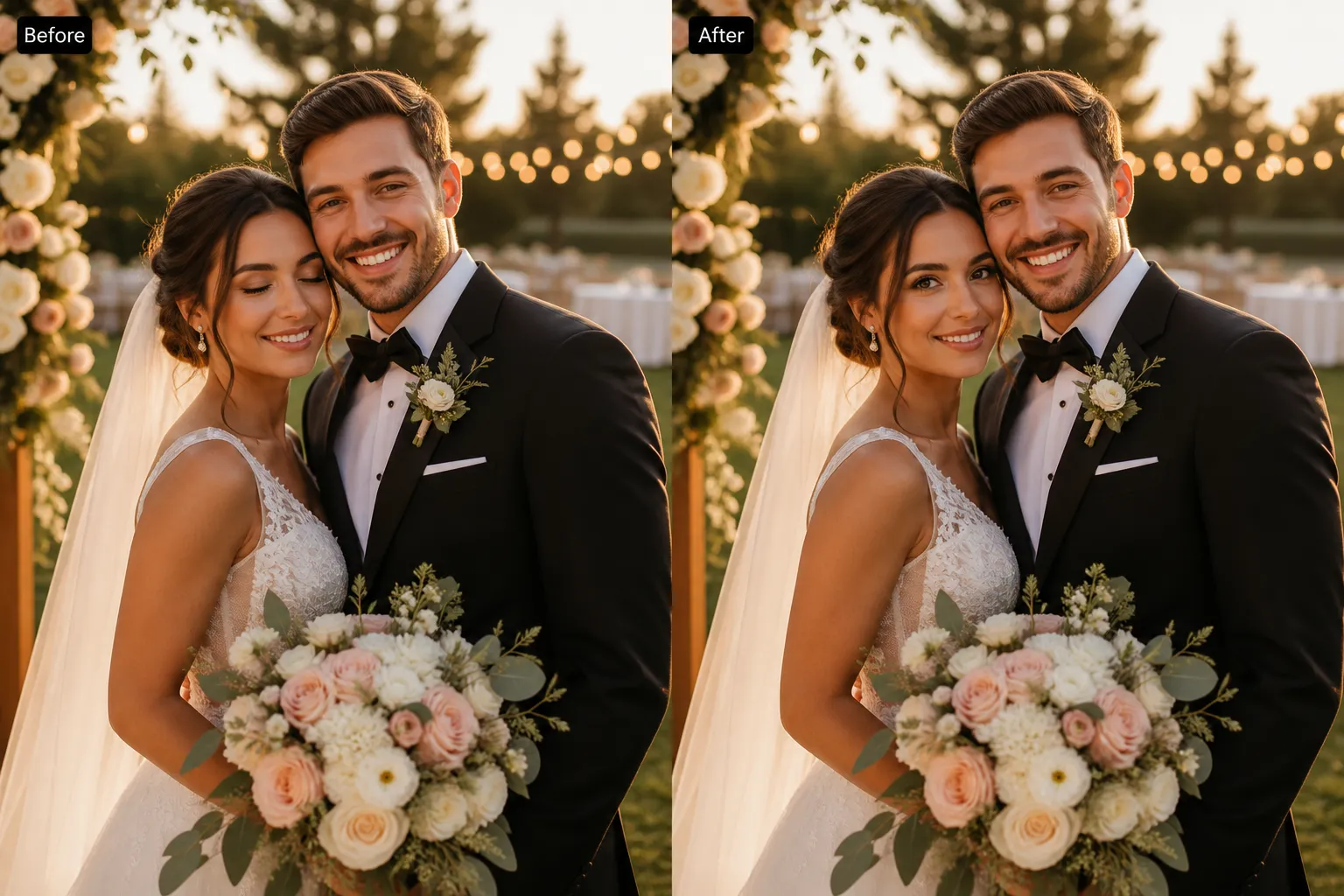
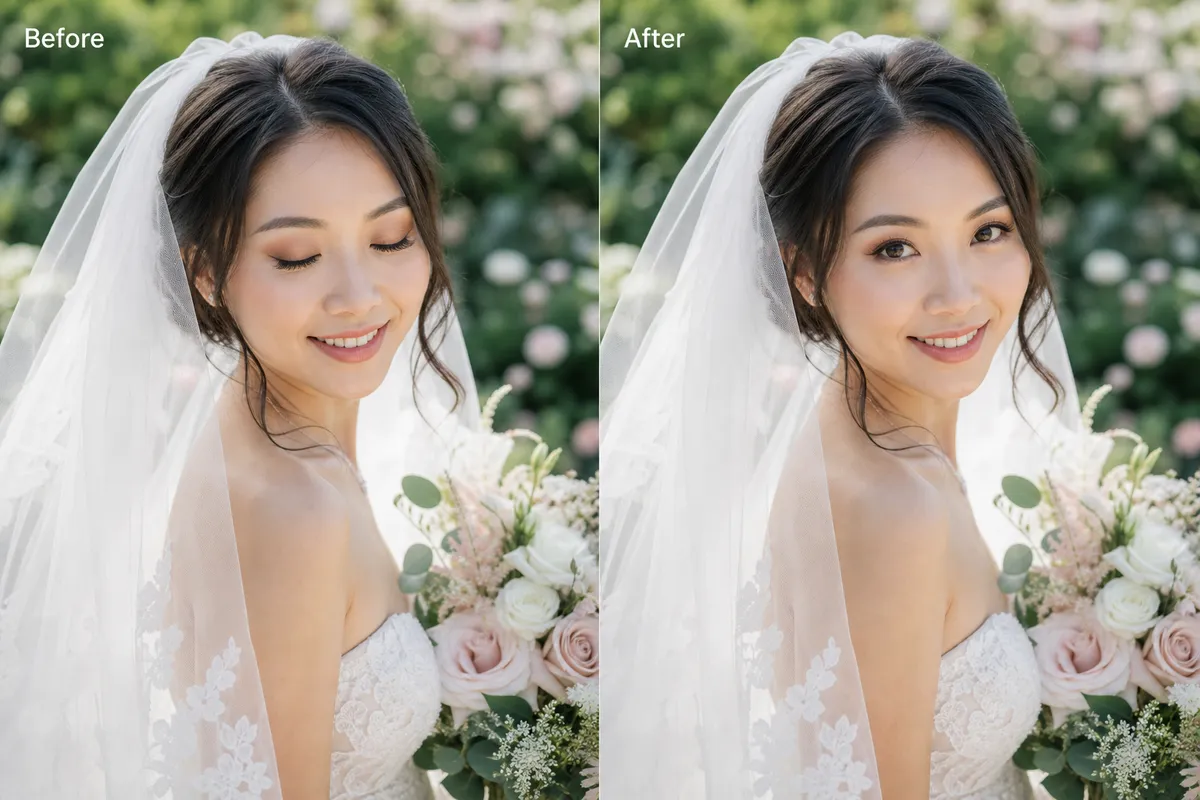
Editaimg's Open Eyes in Photo tool is built around a single, narrow job: take one photo with closed or half-closed eyes and generate a natural open gaze, while leaving the face, expression, pose, clothing, lighting, and background untouched. It's worth being precise about what it does and doesn't do, because that shapes where it's useful in a real culling workflow:
- One photo per run. There's no bulk-upload button — you flag the blinkers during culling, then run each one through individually. The upside: there's no prompt to write and no mask to paint, so each run is upload, click, review, download.
- Handles single portraits and group shots. The built-in instruction targets the closed-eye area while asking the model to keep every other person in the frame unchanged, so it's usable on both a solo bridal portrait and a group lineup where one guest blinked.
- Exports at 1K, 2K, or 4K, as JPG or PNG. That matters for wedding work specifically — a quick web gallery preview and a print-ready album spread need different resolutions, and this covers both without a separate upscaling pass.
- It's generative, not deterministic. The eye area is recreated to be plausible, not recovered from hidden pixels behind the eyelid. Most results land in one attempt; some need a retry at a higher resolution.
Fix the blink without a reshoot
Upload the shot, skip the prompt writing — the built-in instruction targets only the closed eyes and keeps everyone else in the frame exactly as shot.
Open Eyes in Photo →Step by Step: Clearing a Blink During Culling
- Flag it during your first culling pass. Tag any frame where the only problem is a blink — if the pose, focus, or composition is already off, no eye fix will save it, so don't waste a run on it.
- Export the cleanest version you have. Use your highest-quality JPEG export rather than a compressed proof — more visible face detail gives the model more to work with.
- Upload to Open Eyes in Photo and generate. There's nothing to type. The instruction is already scoped to "open only the closed eyes, preserve everything else," so you just upload and run it.
- Compare at full size before you move on. Drag the before/after slider and check the gaze direction, pupil symmetry, and catchlights specifically — these are the details that read as "off" to a client even when they can't say why.
- Choose 2K or 4K if the shot is going into a printed album, 1K is enough for a web gallery or social delivery.
Best Practices for Client-Ready Results
| Do this | Because |
|---|---|
| Start from your best export, not a thumbnail | More visible eyelid, iris, and skin texture gives a more convincing result |
| Keep the untouched original archived | Generative fixes should be reviewable and reversible on sentimental work |
| Review every fixed face at 100% zoom before sending the gallery | Gaze direction and catchlights are the first things a couple will notice if off |
| Retry once at a higher resolution if the first pass looks soft | Results aren't deterministic; a second pass often resolves minor artifacts |
When to Reshoot Instead
Being upfront about limitations saves you a redo later. This tool works best on a clear, front-facing, well-lit face — it struggles the same way any AI model does with heavy motion blur, strong eyeglass glare, hair covering the eyes, or a face turned to a hard profile. If a guest is tiny in the frame or mostly obscured by another person's shoulder, there isn't enough visible face for a convincing fix.
- If the ceremony is still happening and you can grab one more frame in the next few seconds, that's still faster and safer than any software fix.
- If you have a clean burst frame where everyone else's expression also matches, manual compositing can be just as fast and gives you pixel-accurate eyes rather than generated ones.
- If the face is heavily obscured or at an extreme angle, set client expectations rather than trying to force a fix — a visibly wrong eye edit does more damage to trust than an honest note about the one photo that didn't work out.
Frequently Asked Questions
Can I fix closed eyes across a whole wedding gallery at once?
Not in a single bulk action — each photo runs through separately. In practice this is still fast because there's no prompt to write or mask to paint per photo; flagging 15-20 blinkers during culling and running them one by one takes far less time than manual Photoshop compositing on the same stack.
Will the couple be able to tell the eyes were AI-generated?
When the source face is clear and well-lit, the result usually reads as a normal photo. The instruction is scoped to preserve identity, expression, skin texture, and lighting, but you should still review gaze direction and catchlights at full size before delivery — that's where a miss is most visible.
Does it work on group and family formal shots, not just portraits?
Yes. The same tool handles a single blinking face inside a larger group frame, asking the model to leave every other person unchanged. Review the whole frame afterward, not just the fixed face, since generative edits occasionally introduce a small shift nearby.
What resolution should I export for an album versus a web gallery?
Use 2K or 4K output for anything going to print or a large album spread, and 1K is enough for web galleries, social delivery, or client proofing sets.
Is it safe to upload client photos to an online tool?
Only upload photos you have the right to process, and check the tool's privacy policy before sending sensitive client work through any online AI service. Keep your untouched originals archived regardless of which fix you use.
Is Open Eyes in Photo free to use?
It runs on Editaimg's account credit system — the cost is shown before you generate, and there's no separate software to install. You can try it directly on the Open Eyes in Photo page.
Clear your blink stack before the deadline
No masking, no prompt writing, no reshoot request. Upload the flagged photo, review the result, download at print resolution.
Try Open Eyes in Photo →